Stream management dashboard

Your stream,
fully under control.

Overlays, chat commands, music requests, OBS control, AI chatbot and stream analytics — all from one dashboard. No separate tools, no chaos.

StreamPilot — Dashboard
LIVE 1 284 kijkers 2:34:17
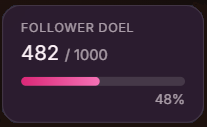
Donatie-goal actief
€ 47 / € 100 47%
Alerts
✦ noorman99 volgt je!
★ lisa_tv abonneert!
✦ pieter_live volgt je!
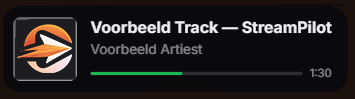
Muziekspeler playing
Eminem — Lose Yourself
aangevraagd door noorman99  ·  3:24
2. Daft Punk — Get Lucky 3. The Weeknd — Blinding Lights
Overlay
Ingeschakeld
Op overlay
Op dashboard

Everything you need, in one place

Click a module to see what it does for your stream.

Without an overlay tool you have to manually track followers and switch every scene in OBS yourself.

Add one URL to OBS as a Browser Source. StreamPilot pushes follow alerts, sub events and goals to your stream — live.

Browser Source · streampilot.nl/overlay/...
✦ noorman99 volgt je nu!
★ pieter_live abonneert! (Tier 1)

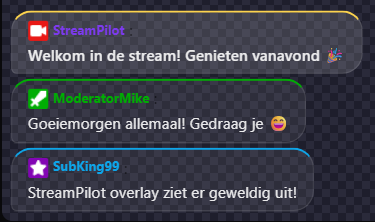
Every stream the same questions: !discord, !goal, !socials. You have to answer them all while you're playing.

Create commands in the dashboard. The bot replies instantly in chat. You focus on the stream.

viewer: !discord
StreamPilotBot: Join ons Discord: discord.gg/xyz
kijker2: !doel
StreamPilotBot: We zijn op 47/100 donaties!

Without a music module your chat fills up with song requests you half-track on a sticky note.

Viewers use !request [song]. The queue fills automatically. You skip, pause and manage from your dashboard.

Lose Yourself
Eminem · aangevraagd door noorman99
2
Get Lucky
Daft Punk · door pieter_live
3
Blinding Lights
The Weeknd · door lisa_tv

Running a fair chat raffle takes minutes: collecting names, finding a tool, announcing the result.

Viewers type !join in chat or redeem Channel Points. The wheel fills itself — one click for the winner.

noorman99
pieter_live
lisa_streamt
+4 deelnemers
Spin!

Viewers don't know how close you are to your goal. The motivation to donate or subscribe stays low.

A goal bar appears live on your stream and updates with every new donation, sub or follower.

Sub-goal deze stream
67 subs doel: 100
67%

Tallying votes manually in chat is chaos. You miss votes, miscount and lose track of the conversation.

Start with !poll start. Viewers vote via !vote A/B/C. The bot counts everything automatically, the overlay shows the live standings.

Welk level spelen we volgende?
A: Level 1
60%
B: Level 2
25%
C: Vrij kiezen
15%

Twitch Channel Points are meaningless by themselves — someone redeems something and nothing happens.

Link rewards to real actions: overlay animation, wheel entry, check-in or a custom chat message.

noorman99
SFX activeren
500 pts
overlay wheel check-in emote rain

You have no idea who your most loyal viewers are. Every stream feels like a new audience.

Viewers check in via Channel Points. You see at a glance who shows up most — and can reward that loyalty.

Top kijkers
👑 noorman9947 streams
pieter_live31 streams
lisa_streamt18 streams

Switching scenes, adjusting audio or starting the stream while playing means constantly alt-tabbing to OBS.

Switch scenes, control the volume of Spotify, Discord or your mic and start the stream — all from your dashboard. Via the local StreamPilot Studio app.

Actieve scene: Just Chatting
🎵 Spotify
55%
🎙 Microfoon
80%
🎮 Game
40%

Chat commands only answer questions literally. New viewers ask context questions that no regular bot handles well.

Connect Gemini or ChatGPT. The bot understands your stream's context and gives fitting responses to questions no command covers.

nieuw_kijker: welk spel speel je eigenlijk?
StreamPilotBot: GamerunNL speelt nu Elden Ring — een open-world RPG van FromSoftware. Al 3 uur bezig met de Erdtree dungeon!
lisa_tv: is er een discord?
StreamPilotBot: Ja! Join via discord.gg/gamerun 🎮

After every stream you don't know how many viewers you had, when the peak was or which events got the most reactions.

Viewer graph per stream, event overview (follows, subs, raids, donations) and watchtime top of your most loyal viewers — tracked automatically.

1 284 kijkers piek
2u 41m gemiddeld
+47 volgers

Features that make the difference

Three things that make StreamPilot unique.

Scene Editor

Build your own scenes with layers, animations and particles. Stack images, text and video. Save your scene as a preset.

Open Scene Editor →
Achtergrond-video
Afbeelding · wobble ✦
Tekst · slide-in
Marketplace

Download presets from other streamers — overlays, alerts and widget themes. Use them as-is or customise to your style.

Browse presets →
Alerts Neon Burst
Goal Pixel Goal ★
Chat Minimal Dark
StreamPilot Studio

Connect OBS to your dashboard via the local Studio app. Switch scenes, control audio and start your stream — all from your browser.

Learn about Studio →
OBS verbonden
▶ Just Chatting
○ Gaming
○ BRB scherm

Popular presets

Community-made overlays and widgets — free or paid.
Live in three steps

1

Create an account

Register and connect your Twitch account. Done in under a minute.

2

Activate what you need

Switch modules on and off. Add the overlay URL as a Browser Source in OBS. Optionally install StreamPilot Studio for OBS control.

3

Go live

StreamPilot handles alerts, commands, music and analytics in the background. You focus on your stream.

Ready to get started?

Manage your stream with StreamPilot. Connect Twitch and activate your modules.

Get started